

.png)
A warranty can help ensure your peace of mind. To help you solve your biggest problems quickly, we’ve put together a collection of the most common Warranty FAQs.
What is an invoice?
- An invoice is an official document provided by the seller at the time of purchase
- It includes important details like the product name, price, date of purchase, and seller information
- An invoice serves as proof of purchase and is required for warranty claims, returns, or service requests
What should I have ready before filling out the warranty form?
Before you start filling out the warranty form, it’s essential to have your invoice and the product’s serial number in hand.
1. INVOICE (Proof of Purchase)
This document serves as your proof of purchase. It verifies the date you bought the product, which is necessary to confirm that your item is still within the warranty period. Our team will validate your invoice to ensure authenticity.
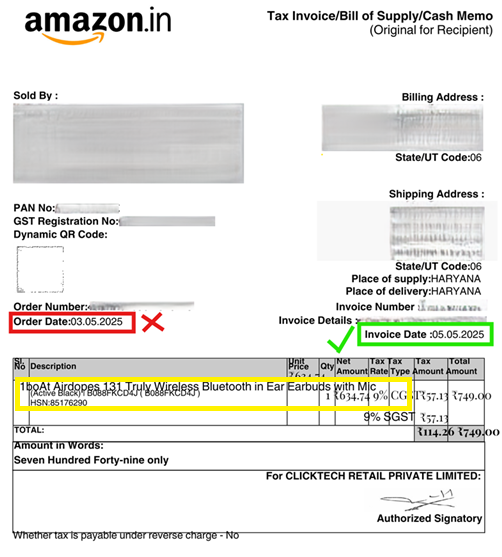
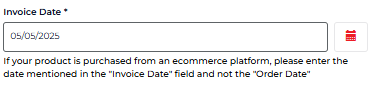
Important Invoice Guidelines:
- Make sure that details like product name, product group, color, invoice date, etc. exactly match with the invoice details in the form
- If your invoice contains 2 types of dates – Order date and Invoice date – enter the “Invoice date” in the form
- Ensure that the date, month and year format exactly match with the invoice
- Ensure that the invoice is not edited, the image should be clear and not blurry, and the file size should not be more than 10 MB
2. SERIAL NUMBER (Product Identifier)
The serial number is a unique identifier for your specific product. It allows the company to track the item’s manufacturing details and history, ensuring that the correct product is being registered for a warranty claim.
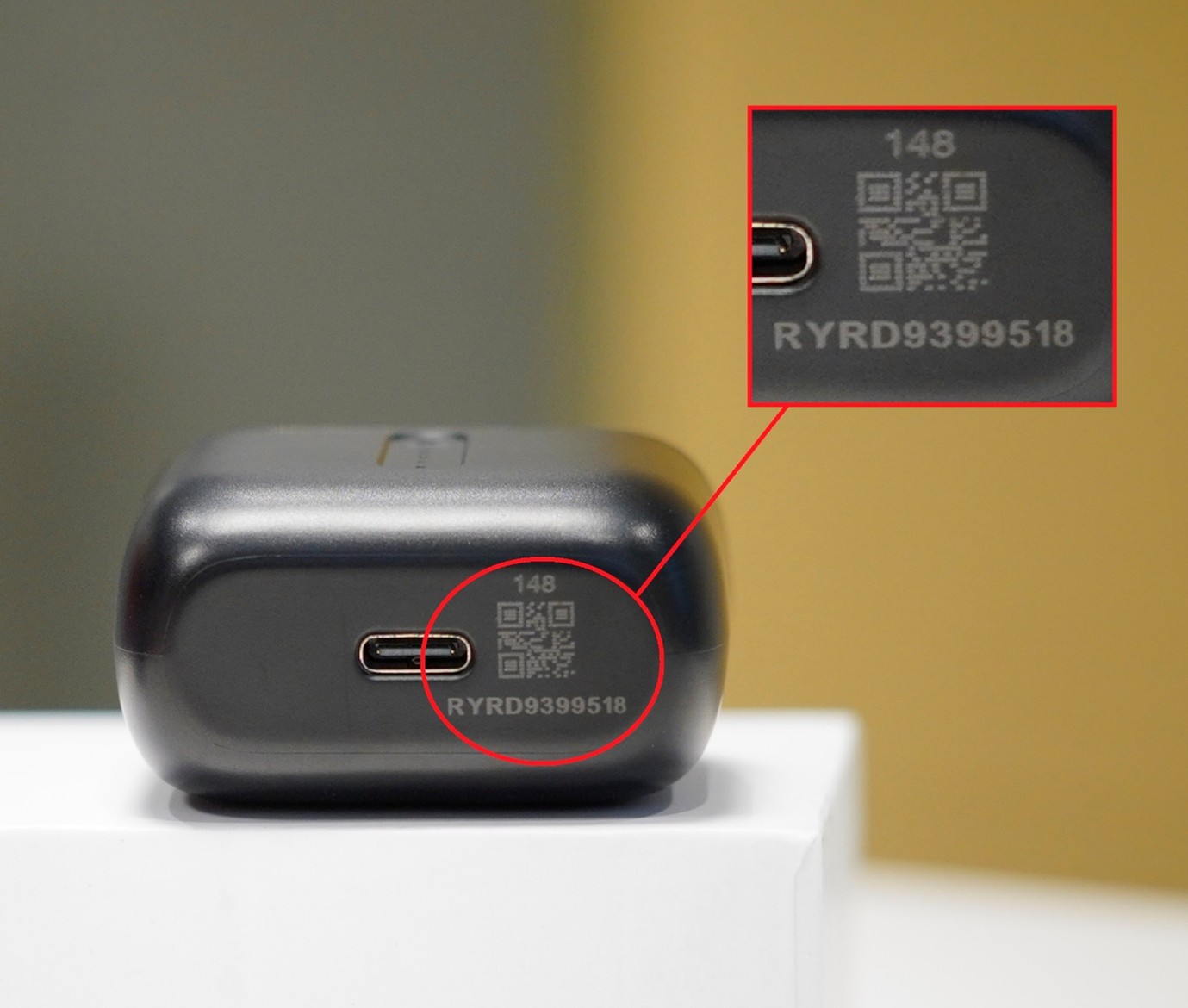
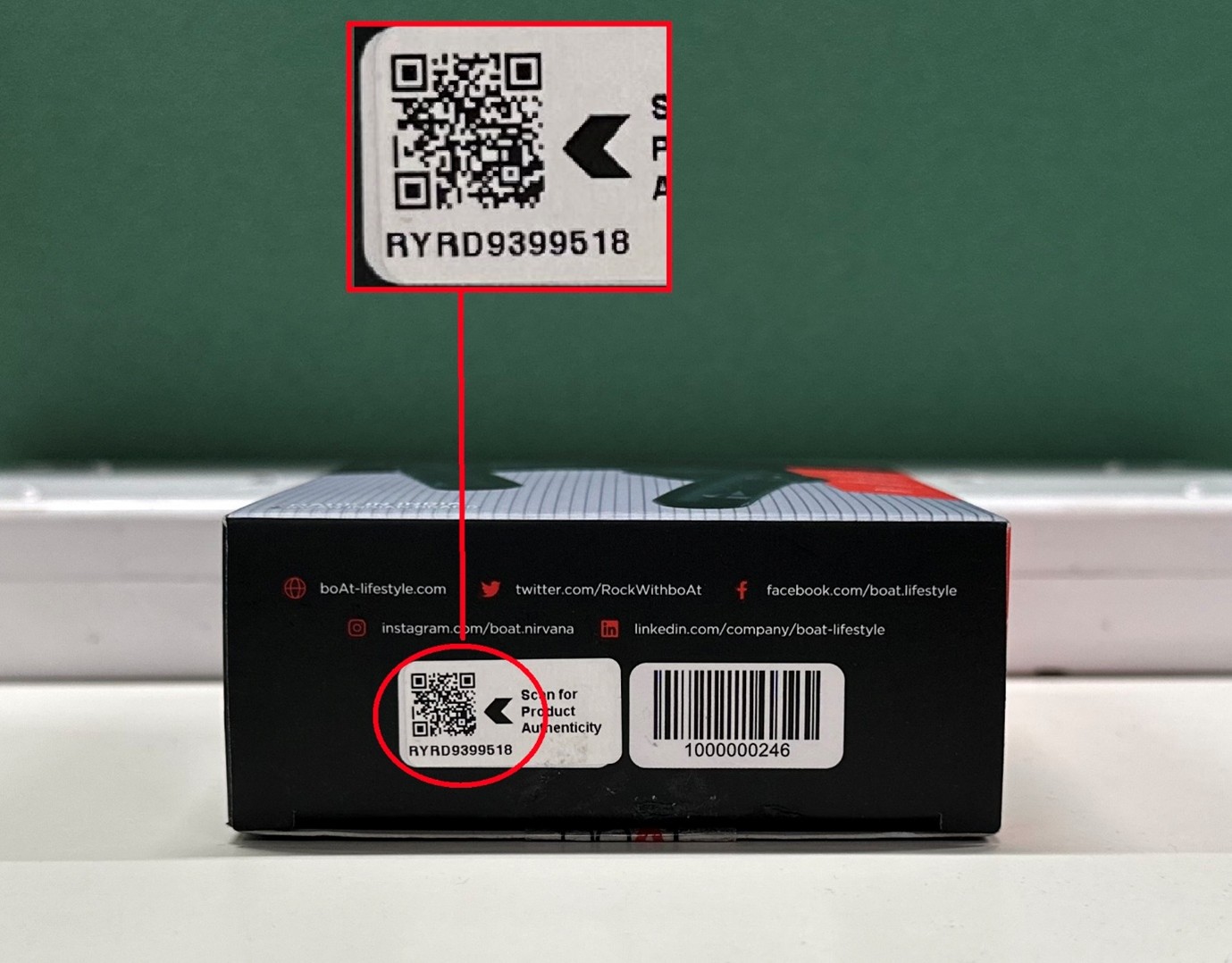
Having these two items ready will significantly speed up the process and help our team assist you more efficiently.
How to claim a warranty/register a complaint?
Step-by-Step Process:
Step 1: Go to www.support.boat-lifestyle.com
Step 2: Click on “Claim your warranty”
Step 3: Fill out the form and check for service center availability. In this section, you can claim a warranty by filling out a form. Also, you can check for the nearest service center
- Product Group: Enter your product category (Example: Wired earphones/Bluetooth earphones)
- Product: Select the model of the product (Example: boAt Rockerz 500 Red)
- Pin code: Enter the pin code that is serviceable at your location. If not serviceable, try an alternate address
Step 4: If the service center is not available near your location, a “Complaint Registration” form will appear on screen. Fill out this form and you will be eligible for door-to-door replacement.
How to check the warranty status?
Track Your Warranty:
Step 1: Go to https://support.boat-lifestyle.com/
Step 2: Click on “Track your Warranty Ticket”
Step 3: Enter your registered mobile number and ticket number, then click “Track”
Result: Your warranty status will appear on the screen
Which product group should I select while claiming a warranty?
Select your product category from the list below:
| Product Group | Description |
|---|---|
| Alexa Speakers | Devices integrating Alexa voice assistant |
| Bluetooth Earphones/Headphones | Wireless headsets, neckbands, and earbuds |
| Bluetooth Speakers | Portable wireless speakers (e.g., Stone series) |
| Wearables | Smartwatches |
| Cables, Charger, Power Banks | Charging accessories (including EnergyShroom series) |
| Gaming Accessories | Immortal series |
| Grooming Kit | Personal care/trimming products |
| Smart Rings | Ring-based wearable technology |
| Soundbar & Party-Pal Speakers | Large home audio and portable party speakers |
| Wired Earphones & Headphones | Devices connecting via an audio jack |
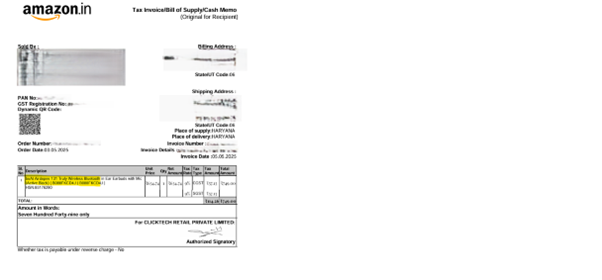
Where to refer product name and color from the invoice?
Product name and color are mentioned in the invoice as shown in the sample image below:
How to download invoice if I purchased from an online platform?
To get your invoice of the purchase, follow the platform-specific steps below:
boAt Website
- Visit https://www.boat-lifestyle.com/
- Click on the profile icon and click “Login”
- Enter mobile number and click “Send OTP”
- Enter the OTP and click “Continue”
- Click profile icon and select “My Orders”
- Locate the order and click “Manage your order” tab
- Click “Invoice” option to download
Amazon
- Login to Amazon
- Go to “Returns & Orders”
- Click Invoice dropdown – Select Invoice 1 or P-slip/Warranty
Flipkart
- Login to Flipkart
- Go to your order
- Select Order
- Download Invoice
Snapdeal
- Login to Snapdeal
- Go to your order
- Get Invoice
Paytm
Paytm sends an email to the customer (Invoice Copy). Or kindly contact the seller to get the invoice.
Myntra
- Access your Myntra account
- Go to “My Orders”
- Find the order
- Locate the invoice link (Note: Look for a link labeled “Invoice,” “Download Invoice,” or similar)
- Download the invoice
Nykaa
- Visit www.nykaa.com
- Login to your account
- Hover over profile and click “My Orders”
- Select order and click “Download Invoice”
Paytm Mall
- Visit www.paytmmall.com
- Login and click “My Orders”
- Click on the order
- Click “Invoice” option
Tata Cliq
- Visit www.tatacliq.com
- Login to your account
- Visit “Order History” in “My account” section
- Find “Download/Request invoice” option
Offline Store
Please contact the respective seller to get the invoice for the product.
How can I get my invoice copy if I purchased from a store?
- Small, independent shops: Contact the store directly, as duplicate invoices may only be available in physical form
- Large retail chains (e.g., Croma, Reliance Digital): You should be able to request an electronic invoice (e-invoice) through their customer service or online platform
Whose details should I enter for the warranty claim?
- Please enter the current product owner’s details, as they will be contacted for verification, service, or pickup. However, keep the product invoice ready, as it’s required to validate the warranty
- It is not necessary for the product owner’s name to appear on the invoice, if the invoice is valid and meets the warranty requirements (such as date of purchase, seller details, and product information)
What does “In-transit” mean?
“In-transit” means your product is currently on its way from one location to another, typically during shipping or pickup.
Can someone claim a warranty if the product was repaired at a local shop?
- If the product has been repaired at a local or unauthorized service centre, your warranty claim may be rejected
- We strongly recommend utilizing authorized warranty services to ensure your product remains eligible for warranty support
Why haven’t I received my product after issuing the warranty replacement?
- Usually, after issuing the replacement product, it takes around 0-5 business days to deliver the shipment to your doorstep
- If the replacement product has not been picked up even after 5 business days, call boAt Customer Service at 022-6918-1920 for further assistance
Why hasn’t my product been picked up for replacement yet?
- The Turnaround time (TAT) for picking up the faulty product unit is between 0-3 business days right from creating the AWB (Airway Bill) of our courier partners
- If this issue persists and exceeds the TAT, please call boAt Customer Service at 022-6918-1920 for all warranty and service-related issues
What is troubleshooting, and how can it help my product?
Sometimes, a small glitch doesn’t need a big repair. Troubleshooting is just a simple way to find out what’s wrong and fix it yourself in minutes – kind of like restarting your router when the Wi-Fi acts up or swapping out dead batteries in a remote.
Most common issues can be solved right at home, getting your product back to peak performance without the wait for a repair or replacement.
How many warranty claims can be raised within the warranty period?
- You can raise multiple warranty claims within the warranty period for a boAt product, if each claim meets the warranty terms (such as manufacturing defects)
- However, in some cases, users may experience technical limitations after multiple claims. If you encounter such issues, contact boAt customer support for further assistance
If only 1 day is left on my warranty, can I still raise a claim?
Yes, you can raise a warranty claim if your product is within the active warranty period on the date of claim submission. The validation or processing time (which may take up to 10 days) does not affect your eligibility—as long as the claim is raised before the warranty expires.
Contact boAt Support
Phone: 022-6918-1920
Website: https://www.support.boat-lifestyle.com
For warranty claims: Claim your warranty
For official details and support:
Visit boAt Warranty FAQs Page