

About D2D Paid Service: Get your out-of-warranty boAt products professionally diagnosed and repaired with door-to-door pickup and delivery. Pay only for diagnosis and repairs you approve.
What is D2D Paid Service?
If your boAt product is out of warranty, the D2D (Door-to-Door) Paid Service allows you to get your favourite gadgets professionally diagnosed and repaired for a service fee. This is a transparent, customer-friendly repair service with upfront diagnosis and repair charges.
How D2D Paid Service Works – 6 Simple Steps
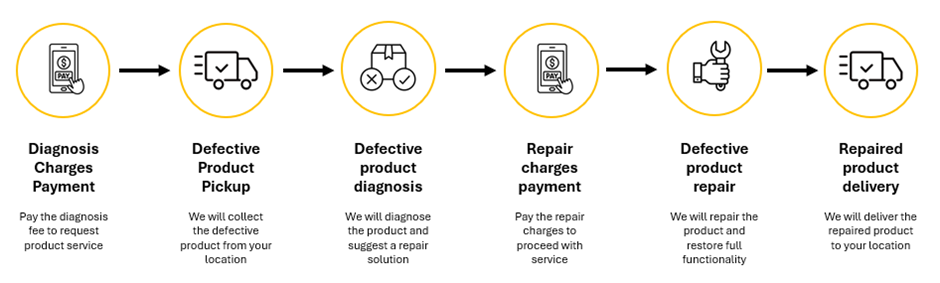
Step 1: Pay Diagnosis Charge – Submit service request and pay diagnosis fee
Step 2: Defective Product Pickup – Free pickup service scheduled within 0-3 days
Step 3: Product Diagnosis – Expert inspection to identify the issue
Step 4: Approve & Pay Repair Charges – Review diagnosis report and approve repairs
Step 5: Product Repair – Professional repair and quality testing
Step 6: Delivery – Free delivery of repaired product (5-14 business days)
Frequently Asked Questions
Popular questions are expanded. Click to view more.
When can I raise a “D2D Paid Service” request?
You can raise a “D2D Paid Service” request when your product goes out of warranty and needs repairing to restore its full functionality. This service is only suitable for partially damaged products. If the product is completely damaged or non-functional, we recommend purchasing a new one instead of opting for repair.
How do I access the D2D Paid Service Request form?
Simply enter your product details in the warranty registration form. If your product is out of warranty, you’ll be automatically redirected to the Paid Service request form.
Click here to raise a service request: D2D Paid Service Request Form
What do the charges cover under D2D Paid Service?
Diagnosis Charges: Covers pickup and delivery of your device, along with a detailed inspection to identify the issue.
Repair Charges: Covers the repair work, quality testing, and the cost of any required spare parts.
How do I fill the D2D Paid Service Request form?
When you enter product details in the warranty registration form for a product that is out of warranty, you are automatically redirected to the “D2D Paid Service Request Form.” The form involves three main steps:
[*] Providing consent for Out-of-Warranty Paid Service[*] Uploading product images as per the displayed reference images
[*] Agreeing to the D2D Paid Service Terms [*] Conditions
Note: Once you complete these steps and submit the form, you will be redirected to the payment gateway to pay the Diagnosis Service charges.
How do I fill the “Repair Consent Form”?
After your product has been diagnosed, you’ll receive the Repair Consent Form. To complete the form:
[*] Review the repair service and confirm applicable charges[*] Accept the D2D Paid Service Terms [*] Conditions
[*] Submit the form to proceed to payment gateway
This ensures a smooth and transparent process for your product repair.
Do I need to provide an invoice for a service request?
Yes, you’ll need to provide your product’s original invoice while raising a service request. This helps us verify your purchase details and ensures a smooth and faster service process.
What is a “Diagnosis Service Invoice”?
A Diagnosis Service Invoice is a document which confirms that you have paid the diagnosis charges for your product. It serves as proof of payment for the inspection service. You’ll receive this via email and WhatsApp after payment is completed.
What is a “Repair Service Invoice”?
A Repair Service Invoice is a document which confirms that you have paid the repair charges for your product. It serves as proof of payment for the repair service and includes details of the work performed.
Where can I access my service invoices?
You can access your service invoices (Diagnosis/Repair) by logging into the tracking page using your Ticket ID and registered mobile number:
You’ll also receive your invoices on your registered mobile number and email after the payment is completed.
How will I get notified about service updates?
You will receive process update notifications on:
[*] WhatsApp of the registered mobile number[*] Registered email address
Is D2D Paid Service available for corporate gifts?
Currently, our D2D Paid Service does not support products received as corporate gifts. While we are unable to process these specific requests in the current phase, we are always working to expand our service options.
What should I do if my Diagnosis payment fails?
If your Diagnosis payment fails, don’t worry! You can simply fill out a new Diagnosis Service request form and try the payment again.
What should I do if my Repair payment fails?
If your Repair payment fails, you can retry the payment using the same payment link, which stays active for 48 hours from the time of the original request.
How are refunds handled if my payment fails?
If money is debited but your payment fails, don’t worry-your refund will usually be processed within 5 to 7 working days via Razorpay and credited back to your original payment method.
Can I cancel my service request?
You can cancel before your product is picked up, and the diagnosis charges will be refunded. After pickup, cancellation is not allowed, and any paid charges will not be refunded as per our policy.
Will I get a refund if the reverse pickup is unsuccessful?
If the reverse pickup fails or is cancelled, your diagnosis charges will be automatically refunded within 24-48 hours. If the refund fails, we’ll check the issue within 48-72 hours and either inform you of the problem or process the refund successfully.
Why is my service ticket marked as “Rejected”?
Your ticket may be rejected if:
[*] The product received is different from the one in the ticket[*] The product works fine after testing
Note: In this case, no refund will be issued, and your product will be returned to your pickup address.
When am I eligible for a refund of Diagnosis Service Charges?
You are eligible for a refund of Diagnosis Service Charges in these cases:
[*] If your pickup address is in a pin code not serviceable by our logistics partner[*] If you cancel your service request before the pickup is initiated
When am I eligible for a refund of Diagnosis AND Repair charges?
If we are unable to complete your repair after you’ve paid, you will receive a full refund of both Diagnosis and Repair charges.
What happens if my product is lost during transit?
If your product is lost during transit, we will send a replacement to your pickup address, and it will come with the standard service warranty.
What happens if I decline the repair service?
If you decide not to proceed with the repair after diagnosis, we will return your product unrepaired to your pickup address, and Diagnosis Charges will not be refunded.
How soon will my product be picked up?
Once you’ve paid the Diagnosis Service fee, we usually schedule a courier to pick up your product from your address within 0-3 days.
When can I expect my product to be returned?
Once your product is picked up, it undergoes a thorough service process and is typically returned to your address within 5-14 business days, depending on your location.
How long is my Repair Consent Form valid?
Your Repair Consent Form and payment link are valid for 48 hours from the time your product diagnosis is completed, so please make the payment within this time if you want us to proceed with the repair.
How can I track my service request?
You can check your product’s status anytime on our tracking page using your Ticket ID and registered mobile number:
When am I eligible for D2D Paid Service warranty?
You are eligible for the warranty once you receive a repaired or replacement product through a D2D Paid Service request. The warranty starts from the date you receive your repaired or replacement product.
How long is the D2D Paid Service warranty?
D2D Paid Service comes with a 120-day warranty. After this period, any future repairs will require payment of service charges. You can raise unlimited warranty requests during the warranty period, and even a request on the last day will be considered valid.
What should I do if my product has issues after warranty expires?
If your product has a problem after the warranty ends, raise a new D2D Paid Service request. You’ll pay the diagnosis charges first, and if you proceed with the repair, pay the repair charges as usual.
How do I fill the D2D Paid Service warranty form?
To claim your D2D Paid Service warranty, follow these steps:
[*] Log in to your warranty account and select the Paid Service ticket you want to claim[*] Enter your product details (product group, name, and pin code)
[*] Enter and verify your mobile number using OTP
[*] Fill in the product issue details
[*] Agree to the Warranty Terms [*] Conditions and submit the form
This will successfully raise your warranty claim for the D2D Paid Service.
What are the Terms [*] Conditions of D2D Paid Service?
You can view all the Terms [*] Conditions on boAt’s official website: D2D Paid Service T[*]C
Quick Reference
| Service Request Form | Open Service Form |
| Track Service Status | Track Ticket |
| Pickup Timeline | 0-3 days after payment |
| Repair Timeline | 5-14 business days |
| Payment Link Validity | 48 hours from diagnosis |
| D2D Service Warranty | 120 days |
Need Help?
Contact boAt Support:
- Phone: 022-6918-1920 (9 AM – 7 PM IST)
- Website: www.boat-lifestyle.com
- Support Page: boAt D2D Paid Services Support
Note: This article is based on boAt Lifestyle’s official D2D Paid Service policy. Policies may change, so we recommend verifying the latest details directly from their official support page before raising a service request.