

📄 Original Source: boAt Official Support – Rockerz Trinity Grande
boAt Rockerz Trinity Grande
Neckband Earphones with 150 Hours Playtime & AI-ENx™ Technology
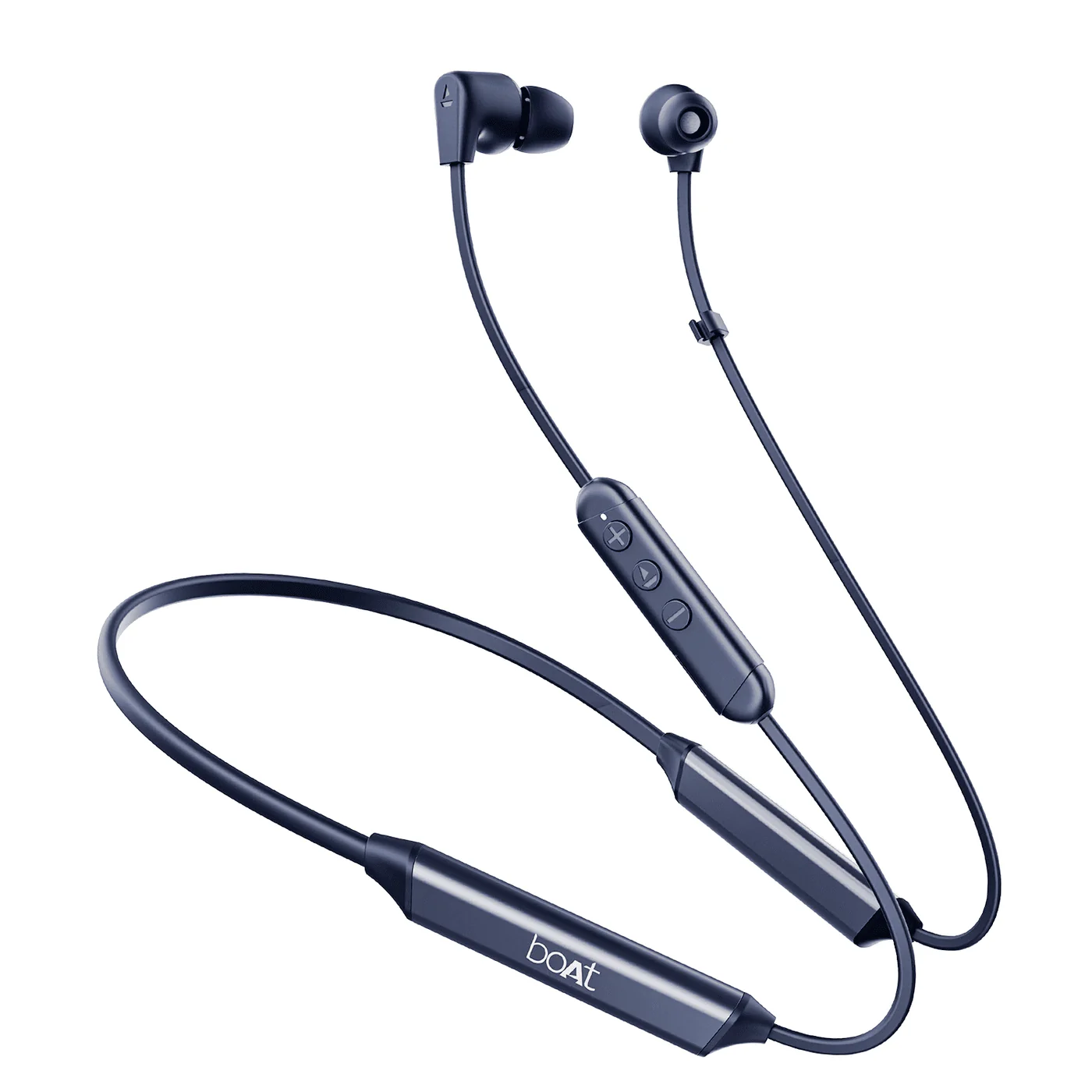
150 Hours of Non-Stop Performance
The Rockerz Trinity Grande redefines the listening experience with:
- 150 Hours Playtime – Weeks of continuous listening
- 10min ASAP™ Charge – 24 hours of playtime in just 10 minutes
- AI-ENx™ Technology – Crystal-clear calls with AI noise cancellation
- BEAST™ Mode – 65ms low latency for gaming
- Dual Pairing – Connect two devices simultaneously
- Bluetooth 5.3 – Stable 10m connection with latest standard
- IPX5 Water Resistant – Built for durability
Key Features at a Glance
🎵 Massive Battery Life
150 hours of playtime ensures weeks without charging
⚡ Ultra-Fast Charging
ASAP™ Charge: 10 mins = 24 hrs playtime
🎮 Gaming Ready
65ms low latency BEAST™ Mode for gaming
🤖 AI Noise Cancellation
AI-ENx™ Technology for crystal-clear calls
Full Specifications
| Specification | Details |
|---|---|
| Type | Bluetooth Wireless Neckband Earphones |
| Bluetooth Version | V5.3 with 10m range |
| Driver Size | 10mm × 2 |
| Music Playtime | Up to 150 Hours |
| Talk Time | Up to 150 Hours |
| Battery Capacity | 220mAh |
| Charging Time | 60 Minutes |
| Charging Interface | USB Type-C |
| Charging Voltage | 5V/2A |
| Frequency Response | 20Hz – 20kHz |
| Transmission Range | 10 Meters |
| Water Resistance | IPX5 |
| Dual Pairing | Yes |
| BEAST™ Mode | Yes; 65ms Low Latency |
| AI-ENx™ Technology | Yes; AI Noise Cancellation |
| ASAP™ Charge | Yes; 10 mins = 24 hrs playtime |
| Number of Microphones | 1 |
Technology & Features
AI-ENx™ Technology
Advanced AI-powered environmental noise cancellation algorithm that eliminates background noise for crystal-clear voice calls. Perfect for professional calls and meetings.
BEAST™ Mode (Low Latency)
Rockerz Trinity Grande features ultra-low 65ms latency for gaming and entertainment. This mode significantly reduces audio lag, providing a more responsive experience during online gaming and video calls.
ASAP™ Charge Technology
10 Minutes = 24 Hours of Playtime
boAt’s proprietary fast-charging technology provides exceptional battery efficiency. Get a full day’s playtime with just 10 minutes of charging, making it perfect for on-the-go usage.
150 Hours of Playtime
With massive 220mAh battery capacity, Rockerz Trinity Grande delivers up to 150 hours of continuous playtime and talk time. Enjoy weeks of listening without worrying about charging.
Pairing & Connectivity
Initial Pairing
- Turn on Rockerz Trinity Grande by holding power button for 3 seconds
- Look for LED indicators showing pairing mode (usually flashing alternately)
- Open Bluetooth settings on your device and search for ‘Rockerz Trinity Grande’
- Select the device from the list
- Enter passcode: 0000 or 1234
- Once paired, LED will show connection status with regular flashes
Dual Pairing (Connect 2 Devices)
- Pair the first device as described above
- Keep the earphones powered on
- Go to Bluetooth settings on a second device
- Search for and select ‘Rockerz Trinity Grande’ to pair the second device
- Both devices remain connected and automatically switch based on activity
Multifunction Button (MFB) Controls
| Action | Function |
|---|---|
| Press & hold MFB (3 sec) | Power ON |
| Press & hold MFB (5 sec) | Power OFF |
| Press & hold MFB (10 sec, while off) | Factory Reset (purple LED confirms) |
| Press MFB once | Play/Pause, Answer/End call |
| Press MFB twice | Reject call / Toggle Dual EQ (Balanced & boAt Signature Sound) |
| Press MFB 3 times | Activate/Deactivate BEAST™ Mode |
| Press & hold MFB (2 sec) | Activate Voice Assistant |
| Press & hold Volume Up (2 sec) | Next Track |
| Press & hold Volume Down (2 sec) | Previous Track |
| Short press Volume +/- | Adjust Volume |
The single-press and double-press MFB actions can be re-mapped in the Hearables app to Volume Up/Down, Previous/Next Track, Voice Assistant, or BEAST™ Mode toggle, giving you full control customization.
LED Indicator Guide
- Power ON: Blue light ON for 1 second
- Pairing mode: Red and blue LEDs blink alternately
- Pairing successful: Solid blue LED flashes for 3 seconds
- Pairing failed (5 min timeout): Red LED flashes once, then auto power off
- Connected: Blue LED flashes every 1 second until timeout; no flash while media plays
- Charging: Red LED remains solid ON
- Fully charged: Red LED turns OFF
- Power OFF: Red LED blinks once
- Low battery (<20%): Red LED blinks every 30 seconds
- Factory reset successful: Purple LED flashes
boAt Hearables App
Installing the App
- Scan the QR code printed on the product packaging, or
- Download boAt Hearables from the Google Play Store (Android)
- Download from the App Store (iOS)
Connecting via the App
- Power on the earphones (alternating red/blue LED = pairing mode)
- Log in to your boAt Hearables account
- Enable Bluetooth and location permission when prompted
- Go to “My Devices” and tap Rockerz Trinity Grande under “Ready to Pair”
- Accept the pairing pop-up on your device
- Optionally save the device to your Google account for faster future pairing
App Features
- Equalizer: Sound tab offers Default, Balanced, Rock, Jazz, Pop, Club, and Custom EQ modes
- Multipoint/Dual Pairing: Toggle in the System tab (ON by default)
- Smart Diagnostics: Tap “Diagnose My Device” to test Bluetooth, mic, speaker, and battery (firmware-level checks only)
- Factory Reset via App: Troubleshooting (“?”) > Malfunctioning > Reset My Device
- Software Updates: System tab > “Check For Updates”
- User Manual: System tab > User Manual > Know More
- Button Customization: Remap MFB single/double-press actions
Charging & Battery
How to Charge
- Use the provided USB Type-C cable with a 5V/2A charger
- Connect USB Type-C port to the charging cable
- Connect to a wall adapter or power bank
- Full charge takes approximately 60 minutes
- LED indicator shows charging status (usually red while charging, green when complete)
Battery Performance Tips
- 150 hours of playtime provides weeks of usage
- Use the provided 5V/2A charger for optimal charging speed
- Keep battery healthy by charging regularly
- ASAP™ Charge provides 24 hours of playtime in just 10 minutes for emergencies
Troubleshooting Guide
Connectivity Issues
Earphones not connecting via Bluetooth
- Ensure earphones are powered on and in pairing mode
- Move earphones within 10 meters of your device with no obstructions
- Verify Bluetooth is enabled on your device
- Forget the device on your Bluetooth settings
- Try pairing again using passcode 0000 or 1234
- Update your device’s Bluetooth drivers or OS if available
Connection keeps dropping
- Check for radio, Wi-Fi, or microwave interference nearby
- Ensure no physical obstructions between earphones and device
- Clear pairing and re-pair the devices
- Keep earphones within 10 meter range
- Update your device’s Bluetooth firmware
Charging Issues
Earphones not charging
- Test the USB Type-C cable with another device
- Use only 5V/2A charger for optimal charging
- Clean the charging port with a dry cloth or cotton swab
- Check if the charging port shows any visible damage
- Try a different power adapter
Battery drains too quickly
- Disable BEAST™ Mode if not needed for gaming
- Reduce volume levels to extend battery life
- Keep Bluetooth range within 10 meters
- Ensure earphones are fully charged before use
- Power off when not in use for extended periods
Audio & Sound Issues
No sound or very low volume
- Check device volume levels – increase if needed
- Verify media player volume is not muted
- Clean earphone grills with cotton swab
- Check for earwax accumulation and clean gently
- Test with different apps and media files
Sound is distorted or crackling
- Reduce device volume – it may be too loud
- Check device equalizer and reset to default
- Clear Bluetooth pairing and re-pair
- Move closer to the device to improve signal
- Try with a different media player or app
Microphone Issues
Microphone not working during calls
- Check microphone grille is not blocked
- Clean microphone area gently with cotton swab
- Verify microphone permission is granted in app settings
- Test with different calling apps
- Ensure AI-ENx™ is working properly by checking settings
Frequently Asked Questions
What is AI-ENx™ Technology?
AI-ENx™ is an advanced artificial intelligence-powered environmental noise cancellation algorithm that eliminates background noise during voice calls. It ensures crystal-clear communication even in noisy environments.
How long is the battery life?
Rockerz Trinity Grande offers up to 150 hours of continuous playtime and talk time on a single charge. With ASAP™ Charge, you get 24 hours of playtime in just 10 minutes of charging.
Is it good for gaming?
Yes! Rockerz Trinity Grande features BEAST™ Mode with 65ms low latency, making it suitable for casual gaming and entertainment. Activate BEAST™ Mode for reduced audio lag during games.
What is ASAP™ Charge?
ASAP™ Charge is boAt’s proprietary fast-charging technology that provides 24 hours of playtime with just 10 minutes of charging. Perfect for emergency top-ups when you’re in a hurry.
Can I connect two devices at the same time?
Yes, Rockerz Trinity Grande supports dual pairing. You can connect two devices simultaneously, and the earphones will intelligently switch between them based on which device has incoming calls or media.
What is the Bluetooth range?
Rockerz Trinity Grande has a maximum Bluetooth transmission range of 10 meters (approximately 33 feet) under normal conditions with no physical obstructions.
Is it water resistant?
Yes, Rockerz Trinity Grande has IPX5 water resistance rating, meaning it can withstand water splashes, light rain, and sweat. However, it’s not recommended for swimming or submerging in water.
How long does charging take?
Full charging takes approximately 60 minutes with a 5V/2A charger. However, ASAP™ Charge gives you 24 hours of playtime in just 10 minutes for emergency situations.
Does it support the aptX codec?
No, Rockerz Trinity Grande does not support the Qualcomm aptX codec.
Does it have Active Noise Cancellation (ANC)?
No, this model does not feature Active Noise Cancellation. It does include AI-ENx™ for call noise reduction, which is different from ANC for music playback.
Can I swim or submerge the earphones in water?
No. While the IPX5 rating protects against splashes, sweat, and light rain, the earphones should not be submerged in water or used for swimming.
Can I lower or turn off the voice prompts?
No, the voice prompts are built into the earphones and currently cannot be adjusted or disabled.
How do I activate Hi-Res Audio with LDAC?
Refer to your phone’s user manual to enable LDAC, since activation varies by device. Note that streaming in LDAC mode may reduce total playtime.
Can I use any USB Type-C cable for ASAP™ Charge?
Yes, any standard USB Type-C cable works with ASAP™ Charge, though the bundled cable with a 5V/2A adapter is recommended for optimal results.
Need Help? Contact boAt Support
📞 Call Us
022-6918-1920
9 AM – 7 PM IST (Mon-Sat)
Closed on Sundays and National holidays
💬 WhatsApp Chat
Get instant support via WhatsApp for quick queries and troubleshooting assistance
Note: This guide is based on official boAt support documentation. For the most up-to-date information, visit boAt Support