

boAt Stone 1200 Pro
60W Powerhouse Speaker with TWS & RGB Lighting
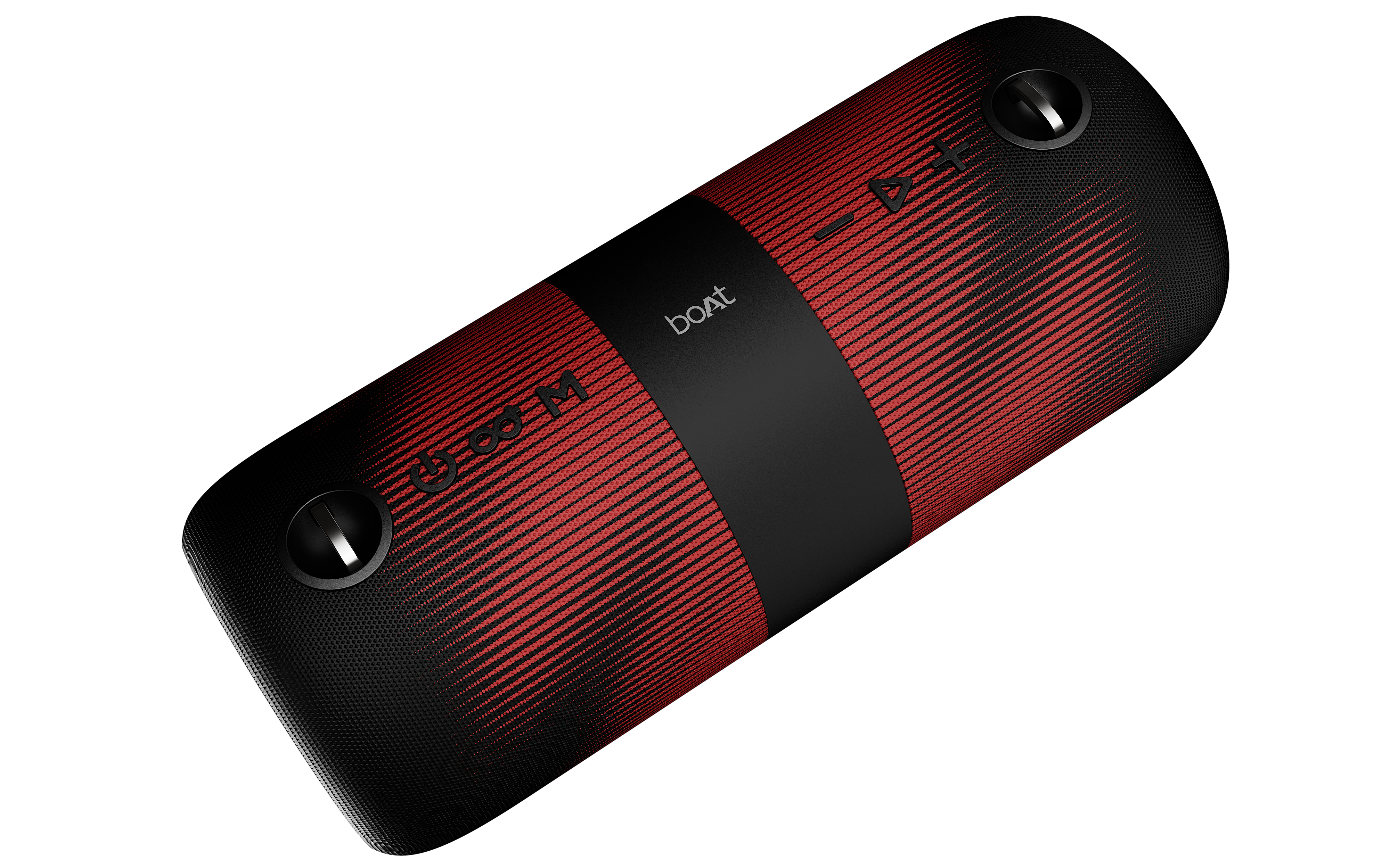
Party-Ready Power
The Stone 1200 Pro delivers professional-grade audio with:
- 60W Signature Sound – Loud, bold, and powerful
- Dual 2.75″ Drivers – Crystal clear audio quality
- TWS Connectivity – Dual speaker mode for double power
- 3 Connectivity Modes – Bluetooth, AUX, TF Card
- 6-Mode RGB Lighting – Dynamic visual effects
- 7.5 Hours Playtime – 4800mAh battery
- 10m Bluetooth Range – Wireless freedom
🔊 Turn up the power and make every beat count with the all-new boAt Stone 1200 Pro. Packed with 60W boAt Signature Sound, massive 76.2 mm drivers, and TWS connectivity for double the power, this speaker is built to make your parties louder, bolder, and better.
Complete Specifications
| Specification | Details |
|---|---|
| Model | boAt Stone 1200 Pro |
| Output Power | 60W Peak Power |
| Drivers | 2x 2.75″ Full Frequency Speakers + 2 Radiators |
| Frequency Response | 60Hz – 20kHz |
| Connectivity | Bluetooth v5.0, AUX (3.5mm), TF Card Slot |
| Bluetooth Range | Up to 10 meters |
| Battery Capacity | 4800mAh Li-Ion |
| Playback Time | Up to 7.5 hours (at 50% volume) |
| Charging Time | 3-4 hours |
| Input Voltage | 5V / 3A |
| Dimensions | 290 x 120 x 124.5 mm |
| Weight | 2.25 kg |
| TWS Mode | Yes – Connect 2 speakers for double power |
| RGB Lighting | 6 Dynamic Light Modes |
Connectivity Modes
📱 Bluetooth Mode
Best for: Wireless music streaming from phones, tablets, laptops
- 10m wireless range
- Dual device support
- Built-in microphone for calls
- Auto-connect to last device
🎧 AUX Mode
Best for: Wired connection with 3.5mm audio jack
- Universal compatibility
- Direct audio connection
- No battery drain from Bluetooth
- Perfect for older devices
💾 TF Card Mode
Best for: Standalone playback without external device
- Insert microSD/TF card
- MP3 format support
- Portable music library
- No Bluetooth needed
🔊 TWS Mode
Best for: Stereo setup with dual speakers
- Connect 2 Stone 1200 Pro
- Double the power output
- Perfect for parties
- Synchronized playback
Device Controls Guide
🎛️ Power & Mode
Power On/Off: Long press Power button (3 seconds)
Switch Modes: Short press Mode (M) button – Bluetooth / AUX / TF
Disconnect Device: Double press Mode (M) button
Factory Reset: Use pointed object in reset port
🎵 Music Controls
Play/Pause: Short press ▶ button
Next Track: Long press + button (3 seconds)
Previous Track: Long press – button (3 seconds)
Volume Up: Short press + button
Volume Down: Short press – button
Voice Assistant: Double press Power button
☎️ Call Management
Answer Call: Short press ▶ button
End Call: Short press ▶ button
Reject Call: Long press ▶ button (3 seconds)
Redial: Short press ▶ button 3 times
RGB Lighting Control
6 Dynamic Light Modes
The Stone 1200 Pro features stunning RGB lighting to match your party vibe:
- Light Mode 1: Steady color glow
- Light Mode 2: Pulsing rhythm effect
- Light Mode 3: Color cycle animation
- Light Mode 4: Strobe effect
- Light Mode 5: Rainbow gradient
- Light Mode 6: Music-reactive lighting
Control: Short press Power button to cycle through light modes or turn off lighting
TWS Mode – Connect 2 Speakers
🔊 Double Your Power
Connect two Stone 1200 Pro speakers for stereo sound and maximum party power:
- Power on both speakers – Ensure both are in Bluetooth mode
- Primary speaker setup: Only need to configure one unit
- Activate TWS: Press and hold the Play/Pause button on one speaker for 2 seconds until you hear a beep
- Wait for connection: Release the button and wait a few seconds for the speakers to sync
- Pair with phone: Enable Bluetooth on your mobile and search for “Stone 1200 Pro”
- Select and play: Select the device from the list and start playing music
- Enjoy stereo sound: Music plays through both connected speakers simultaneously
Charging & Battery
⚡ Battery Information
- Capacity: 4800mAh Li-Ion battery
- Playtime: Up to 7.5 hours at 50% volume
- Charging Time: 3-4 hours with recommended charger
- Charging Indicator: Red LED solid during charging, turns off when fully charged
- Input Voltage: 5V / 3A (use recommended charger only)
⚠️ Warning: Do NOT use 9V or 12V chargers as they will damage the speaker. Only use 5V/3A charger.
Troubleshooting Guide
Connectivity Issues
Speaker not connecting via Bluetooth
- Check speaker is in pairing mode (LED will blink white)
- Ensure speaker is within 10m range with no obstructions
- Verify your device supports Bluetooth connections
- Try entering passcode: 0000 or 1234
- Check if device has software issues – restart and try again
- Forget device from Bluetooth, update mobile OS
Speaker keeps disconnecting occasionally
- Try restarting the speaker
- Test with different devices and media players
- Remove obstructions between speaker and device
- Move device closer to the speaker
- Perform factory reset of the device
AUX mode not working
- Restart the device
- Confirm speaker is in AUX mode (short press Mode button)
- Check AUX cable is properly connected on both ends
- Try different cable or different device
TF Card mode not working
- Restart the device
- Verify speaker is in TF mode (short press Mode button)
- Check TF Card is functional on another device
- Ensure music files are in MP3 format
- Try a different TF Card
Charging & Power Issues
Speaker not charging or battery life is low
- Restart the device
- Check charging cable is not broken – try different cables
- Verify charger is 5V/3A (NOT 9V or 12V)
- Check red LED on speaker indicates charging
- Inspect charging port for damage
- Perform factory reset
Speaker does not power on
- Charge the speaker fully first (solid red LED means charging)
- Check charger voltage is correct (5V/3A)
- Long press power button for at least 3 seconds
- Check for physical damage or exposure to hazards
Audio & Sound Issues
No sound from speaker
- Restart the device
- Fully discharge, then charge fully again
- Verify device is properly connected:
- Bluetooth: Check blinking white LED
- AUX: Verify jack is properly inserted
- TF Card: Ensure card is properly functioning
- Try connecting through different mode or device
- Check device has not been damaged or exposed to hazards
Sound is distorted, low volume, or low bass
- Check connected device doesn’t have equalizer settings applied
- Move device closer and remove obstacles
- Check if distortion occurs only at high volumes
- Test on different media players and devices
- Test at different battery charge levels
- Check for water droplets – use blow dryer to dry if needed
Built-in controls not working
- Check controls don’t work with other connected devices
- Verify speaker is NOT in AUX mode (buttons don’t work in AUX)
- Check if media player supports these controls
- Check for physical damage to buttons
Microphone Issues
Microphone not working
- Check microphone is not blocked by dust
- Hold microphone at adequate distance from mouth
- Check microphone not exposed to hazards (sun, fire)
- Verify microphone not exposed to water above IPX rating
- Note: Microphone does NOT work in AUX mode
- Try factory reset
Need Help? Contact boAt Support
📞 Call Us
022-6918-1920
9 AM – 7 PM IST
Closed on Sundays and National holidays
💬 WhatsApp Chat
Get instant support via WhatsApp for quick queries and troubleshooting assistance
Note: This guide is based on official boAt support documentation. For the most up-to-date information, visit boAt Support