

@{rendered=
@{rendered=
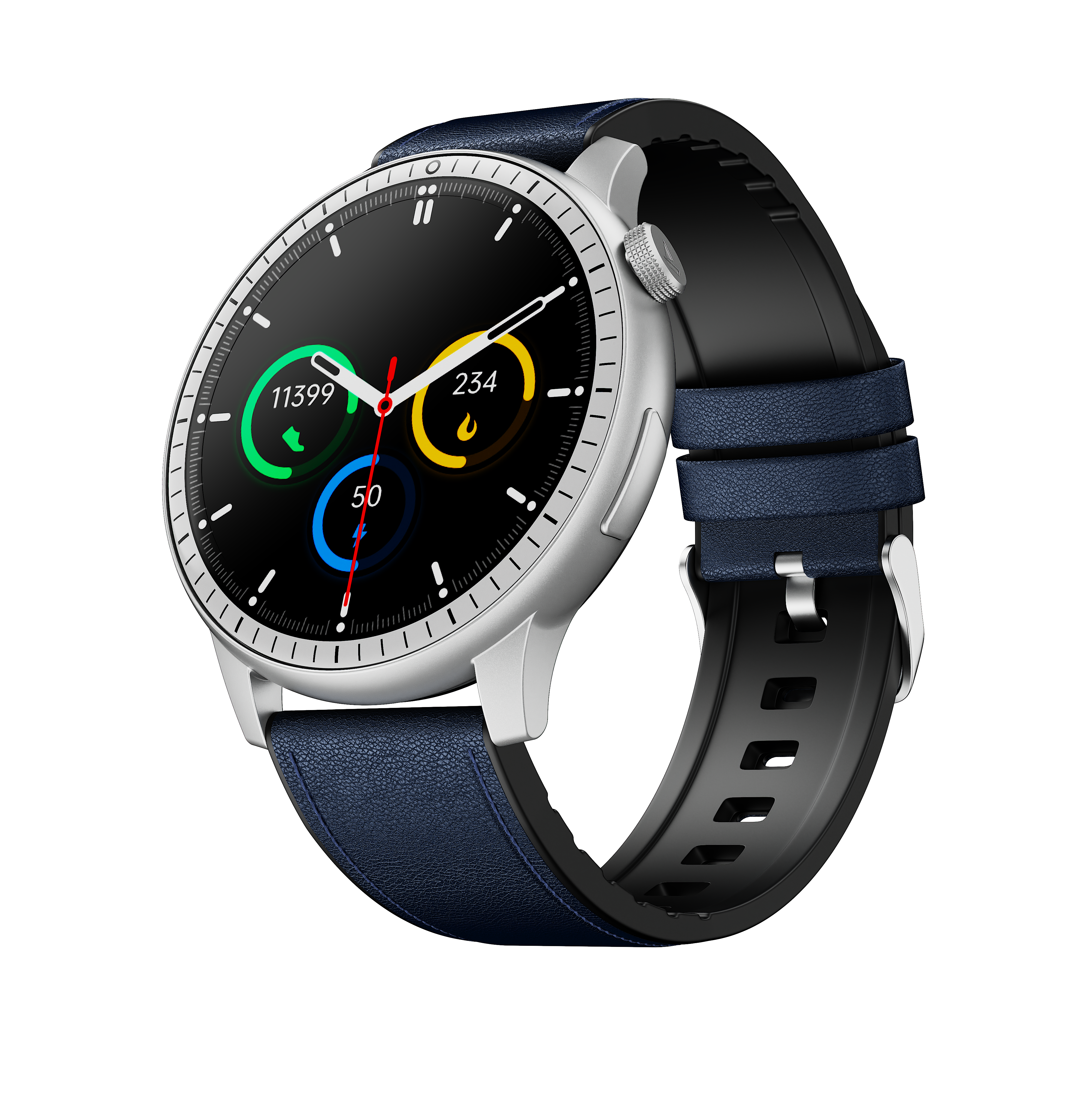
boAt Valour Watch 1 R: Premium smartwatch with 1.43″ AMOLED display, 700+ sports modes, X2 processor, 10-day battery, AI coaching, health tracking, turn-by-turn navigation, and advanced fitness features.
Product Overview
The boAt Valour Watch 1R steps into the future of smart fitness with a lightweight aluminium build and an immersive 1.43″ AMOLED display. Blending premium style with powerful performance, it features AI-powered coaching, health nudges, 700+ sports modes, advanced health tracking, turn-by-turn navigation, up to 10 days battery life, and a powerful X2 processor built to move as fast as you do.
Technical Specifications
| Specification | Details |
| Model | Valour Watch 1 R |
| Display Type | AMOLED Display |
| Screen Size | 3.63 cm (1.43″) |
| Screen Resolution | 460 x 460 pixels |
| Processor | X2 Processor |
| Battery Capacity | 300 mAh |
| Battery Life | Up to 10 Days |
| Charging Time | ~2 Hours |
| Bluetooth Version | v5.3 |
| Water Resistance | IP68 (Splashes, sweat, light rain) |
| Sensors | Heart-Rate Sensor, Blood Oxygen Sensor (SpO2) |
| Watch Body Material | Aluminium + PC (Lightweight) |
| Wrist Band Material | Leather, Silicone, or Steel strap |
| Compatibility | Android 7.0+ and iOS 14.0+ |
| Sports Modes | 700+ modes available |
Key Features
Health & Fitness Tracking
- . 700+ Sports Modes – Walking, Running, Cycling, Yoga, Gym, and more
- . AI-Powered Coaching – Personalized fitness guidance
- . Health Nudges – Smart reminders for wellness
- . Heart Rate Monitoring – Real-time BPM tracking (Current, Max, Min, Resting)
- . SpO2 Measurement – Blood oxygen level tracking
- . Stress Monitoring – Heart rate variability based stress levels
- . Sleep Tracking – Duration and classification (Deep, Light, REM, Awake)
- . HRV Monitoring – Heart rate variability tracking
- . Steps & Distance – Daily activity and distance covered
- . Calories Burned – Workout energy expenditure
Smart Features
- . Turn-by-Turn Navigation – GPS-guided directions on wrist
- . Bluetooth Calling – Dialer, Phone Book (20 contacts), Call History
- . Notifications – Call alerts and message notifications
- . Music Control – Play/Pause, Skip, Volume adjustment
- . Camera Control – Remote capture with 1-10 second timer
- . Find My Phone – Sound and flashlight alert
- . Voice Assistant – Hands-free commands
- . Games – Built-in watch games
- . Women Health – Period tracking and health alerts
Display & Customization
- . 1.43″ AMOLED Display – 460×460 resolution, vibrant colors
- . 5 Default Watch Faces – Plus additional customizable faces
- . Background Image Customization – Set any image as watch face background
- . Brightness Control – Adjustable screen brightness
- . Always-On Display – Optional continuous screen on mode
- . Screen Saver – Configurable sleep timer
Additional Features
- . Alarm Clock, Stopwatch, Timer, Calendar, Weather Forecast
- . Breath Exercise Guidance – Guided breathing routines
- . Reminders and Notifications – Customizable alerts
- . Calculator – Quick calculations
- . Dial Pad – Direct phone number input
- . Flashlight – Torch mode for emergency lighting
- . Battery Saver Mode – Extended battery life mode
- . SOS Feature – Emergency help trigger
- . Do Not Disturb (DND) – Quiet mode
Setup & App Installation
Download boAt Crest App
Two Installation Methods:
- Via QR Code: Scan QR code from watch settings or product manual, follow on-screen instructions
- Via App Store: Search “boAt Crest” on Google Play or Apple App Store, tap Install
Compatibility Requirements:
- Android 7.0 and above
- iOS 14.0 and above
Pairing with Phone (5 Steps)
- Download boAt Crest: Get app from Play Store (Android) or App Store (iOS)
- Allow Permissions: Grant all required permissions when app launches
- Register Account: Enter mobile number and verify with SMS code
- Find Device: Select “Valour Watch 1 R” from available devices list
- Complete Pairing: Watch syncs with app automatically after confirmation
Operating the Watch
Power Control
- Power On: Long press Power button (3-5 seconds) until screen lights up
- Power Off: Long press Power button (3-5 seconds), swipe to confirm
- Main Menu: Short press Power button from home screen
- Quick Menu: Swipe down from home screen for frequent features
Watch Faces & Menus
- Change Watch Face – Method 1: Rotate Power button to scroll through faces
- Change Watch Face – Method 2: Long-press home screen, swipe to browse, tap to set
- Main Menu: Short press Power button, rotate to scroll through options
- Quick Menu (Shortcut): Swipe down for Settings, Battery Saver, SOS, DND, and more
Access Sports Modes
- Short press Lower Side Button to open Activities menu
- 700+ sports modes available for indoor and outdoor training
- Includes: Walking, Running, Cycling, Yoga, Gym, Basketball, Football, and more
Charging & Battery
Charging Instructions
Charging Steps:
- Attach magnetic end of charging cable to watch back (charging pad)
- Connect USB-A end to 5V/2A rated adapter or power bank
- Watch display shows charging status and percentage
- Fully charge before first use (~2 hours)
Important Charging Notes:
- Use official charger for optimal speed
- Computer USB ports charge slower (lower current)
- Do NOT use phone chargers (too high current)
- 5V/2A adapter is standard requirement
- Displays charging percentage while charging
Battery Life: Up to 10 days on single charge (varies based on usage)
Frequently Asked Questions
How do I sync data with the watch?
Data automatically syncs when you open boAt Crest app. For manual sync: open app > tap “Tap to Sync”. Keep watch within 10m Bluetooth range with app running in background. Manual drag-down on app homepage also triggers sync.
How do I set my daily step target?
Open boAt Crest app > Profile > My Goals > Edit on Step Goal card > Enter target in ‘Your Steps Goal’ section > Update Steps Goal. Can be modified anytime for convenience.
Why can’t I see sleep data on the watch?
Wear watch while sleeping for tracking. Minimum 3 hours sleep required for recording. Check that watch is properly synced via app in morning. Sleep won’t record if significant movement between 6-8 AM.
How does heart rate and SpO2 monitoring work?
Green lights (optical sensor) monitor heart rate by detecting blood passage. Red light is blood oxygen (SpO2) sensor. Tap heart rate icon to check real-time BPM. Tap Measure for detailed readings. Note: Measurements are reference only, not medical-grade.
The watch shows steps even when I’m not walking. Why?
Watch tracks wrist movement, so activities with significant hand movement (eating, typing, cooking) can register as steps. This is normal behavior for wrist-based trackers.
Can I control music from the watch?
Yes. Open music on phone first, then tap Music Control on watch to Play/Pause, Skip tracks, or Adjust volume. Requires Bluetooth connection. Enable music control in app first. Some music apps may not be supported.
How do I use the phone finder feature?
Tap Find Phone on watch to trigger phone’s sound and flashlight. Requires camera permission enabled and phone sound at maximum. If alert slider present, set to ringing mode.
Is the watch waterproof?
No, it’s water-resistant (IP68). Can withstand splashes, sweat, and light rain. Do NOT use for swimming or deep water exposure.
What’s stress mode and how is it calculated?
Stress is recorded using heart rate variability (HRV). Ranges: 1-29% Relax | 30-59% Normal | 60-79% Medium | 80-99% High. Available in watch menu for real-time monitoring.
Troubleshooting
Watch Won’t Connect to Phone
- Verify Android 7.0+ or iOS 14.0+ required
- Download boAt Crest from Play Store/App Store
- Allow all permissions when app launches
- Find watch in available devices list and click to pair
- Ensure Bluetooth is enabled on phone
Watch Keeps Disconnecting from App
- Bluetooth range is 7-10 meters – keep closer
- Go to More > Help & Feedback > Troubleshoot Connectivity in app
- Toggle phone Bluetooth OFF/ON and try again
- Restart phone and app
- iOS: Go to Bluetooth settings, tap “i” icon on watch name, Forget device, relaunch app
Data Syncing Slowly
- Keep watch within 10m Bluetooth range
- Drag down on app homepage to manually sync
- Unbind device from app and reconnect if stuck
- Restart phone if syncing continues to fail
No Notifications on Watch
- Enable call and message alerts in boAt Crest app
- Sync watch after enabling alerts
- Toggle phone Bluetooth OFF/ON
- Reinstall boAt Crest and re-pair watch
- Factory reset watch if issue persists
Wrist Lift/Wake Gesture Not Working
- Display takes 1-2 seconds to activate – wait for response
- Check for physical damage or mishandling
- Ensure not exposed to direct sunlight or liquid
Watch Controls Quick Reference
| Action | Function |
| Short Press Power Button | Open Main Menu |
| Long Press Power Button (3-5s) | Power On/Off |
| Rotate Power Button | Scroll Menu or Change Watch Face |
| Swipe Down from Home | Quick Menu (Settings, Brightness, etc) |
| Short Press Lower Button | Access Activities/Sports Modes |
| Long Press Home Screen | Browse & Set Watch Faces |
Resources
User Manual: Download PDF Manual (0.61 MB)
Contact Support
Need Help?
| Support Channel | Details |
| Phone Support | 022-6918-1920 9 AM – 7 PM IST Closed: Sundays and National Holidays |
| WhatsApp Support | Launch Chat |
| Official Support | boAt Valour Watch 1 R Support |
Pro Tip: Keep watch within 10m of phone for best Bluetooth stability and fastest data syncing.
Note: Based on official boAt documentation. Heart rate and SpO2 measurements are for reference only, not medical-grade. Visit official support page for latest updates.
; protected=False}
; protected=False}